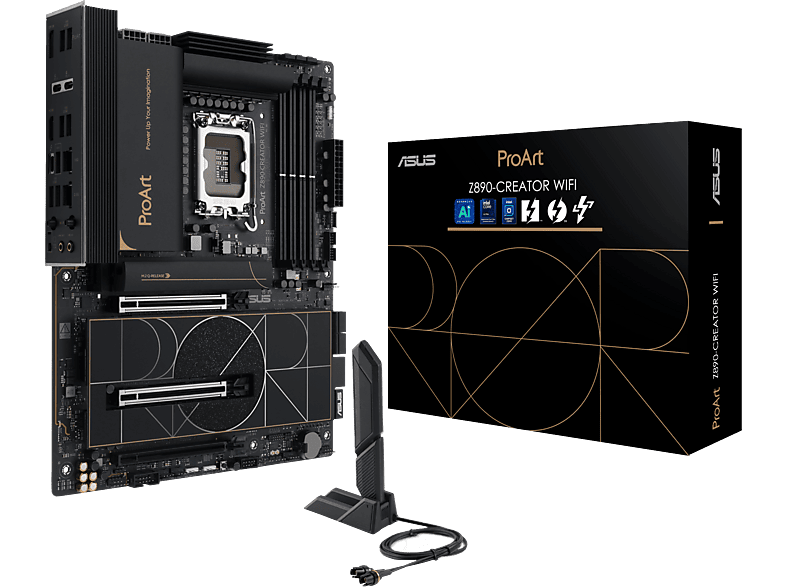
ASUS ProArt Z890 Creator WiFi DDR5 PCIe 5.0 ATX Motherboard
AsusEUR 550.07 Er is één aanbieding voor dit product.
<div> <h3> <br /> <br /> <span style="color:#0066cc;"><em><strong>Intel Z890 LGA1851 ATX content creation motherboard with PCIe® 5.0 DDR5 slots two USB4® ports 10G and 2.5G Ethernet WiFi 7 five M.2 slots plus a USB 20Gpbs front-panel header</strong></em></span></h3> <div> <ul> <li> Thunderbolt™ 5 & Thunderbolt™ 4 Onboard</li> <li> Dual Ethernet & WiFi 7</li> <li> ProArt Creator Hub - Features Pantone's color management utilities</li> <li> Exclusive AI Technologies - AI Overclocking AI Cooling IIAI Networking II and AI Advisor</li> <li> Easy PC DIY to Make Your Life Easier - PCIe Slot Q-Release Slim M.2 Q-Release M.2 Q-Side</li> <li> M.2 Q-Latch and WiFi Q-Antenna</li> <li> PCIe® 5.0 - Full support for next-gen graphics cards</li> <li> 16+1+2+2 Power Stages</li> <li> Unleash DDR5 with DIMM Fit and AEMP III</li> <li> NPU Boost</li> </ul> <div> </div> </div> <div> </div> <div> </div> <div> The ProArt Z890-CREATOR WIFI empowers creators of all levels by maximizing the performance of the latest Intel® Core™ Ultra Processor (Series 2) processors with 16+1+2+2 team power stages DDR5 slots PCIe® 5.0 and lightning-fast connectivity including dual Thunderbolt™ 5 ports 10G and 2.5G Ethernet and WiFi 7.</div> <div> </div> <div> This motherboard manifests a professional elegant and precise vision for content creators of all kinds with a style elevated by tone-on-tone layers of black infused with metallic gold touches. A subtly designed I/O cover provides a sleek and sophisticated look while concealing the premium connectors within.</div> </div> <div> <div> <br /> </div> </div> <div> </div> <div> <br /> <br /> <br /> <br /> <div> <span style="font-size:16px;">All You Need for Maximum Productivity</span></div> <ul> <li> <strong>Thunderbolt™ Connectivity </strong>- Get immersed in your creations with two Thunderbolt™ 5 and one Thunderbolt™ 4 ports for connecting to all your compatible content-creation gadgets enjoying up to 80 Gbps of bi-directional bandwidth and up to 120 Gbps with Bandwidth Boost. To further push your creative work with one 8K or two 4K color-accurate monitors you can connect your discrete graphics card to the onboard DisplayPort™ In port on the rear I/O panel and direct the video output via the Thunderbolt™ 5 port*.</li> <li> <strong>10 Gb & 2.5 Gb Ethernet</strong><strong> </strong>- Dual Ethernet ports provide fast data transfers simultaneously for 2.5G internet streaming or uploading and 10G for local network-attached storage (NAS) allowing for improved data organization and security.</li> <li> <strong>WiFi 7</strong><strong> </strong>- The revolutionary WiFi 7 is up to 4.8X faster than standard WiFi 6 thanks to technology like 320 MHz channels on the 6 GHz band and 4K QAM*. Multi-Link Operation (MLO) provides a more stable WiFi connection and lower latency unlocking the realms of the unknown in gaming streaming and industrial IoT.</li> <li> <strong>ASUS WiFi Q-Antenna</strong><strong> </strong>- Dual transceivers support the 2.4 5 and 6 GHz bands to enable faster throughput with directional sensitivity to improve signal quality and cover greater distances.</li> <li> <strong>Five Onboard M.2 Slots</strong><strong> </strong>- ProArt Z890-CREATOR WIFI features one PCIe 5.0 M.2 slot and four PCIe 4.0 M.2 slots to enjoy the fastest data transfers of up to 128 Gbps* and all M.2 slots support NVMe RAID configurations to take advantage of the latest available speeds.</li> <li> <strong>PCIe 5.0 Expansion Slots</strong><strong> </strong>- Both of the x16 expansion slots are PCIe 5.0 offering incredible speeds of up to 64 GB/s for compatible devices. To bear the brunt of massive graphics cards they are also protected with SafeSlot retention brackets and the top slot can be released easily via Q-Release Slim.</li> <li> <strong>Seamless Dual-PC Sharing with Thunderbolt™ Share</strong><strong> </strong>- Experience a revolutionary way to interact with two PCs using Thunderbolt™ Share—the ultrafast connectivity solution that transforms your dual-PC setup. Seamlessly share screens keyboards mice storage and files between two computers with the unparalleled speed of Thunderbolt™ technology.</li> </ul> <div> </div> <div> </div> <div> </div> <div> </div> <div> </div> <div> </div> <div> <span style="font-size:16px;">The Core of Your Powerful Workstation</span></div> <ul> <li> <strong>Robust Power Design</strong><strong> </strong>- Designed to meet the needs of high-core-count CPUs the ProArt Z890-CREATOR WIFI features 16(90A)+1(90A)+2(90A)+2(80A) power stages that integrate high-side and low-side MOSFETs and drivers into packages rated for up to 90 amps each. This configuration ensures optimal power delivery efficiency stability and performance for new Intel® Core™ Ultra Processors (Series 2).</li> <li> <strong>Eight-Layer PCB Design</strong><strong> </strong>- This enhances quick heat dissipation around the voltage regulators for enhanced stability and overclocking.</li> <li> <strong>ProCool II Connectors</strong><strong> </strong>- These are built to tight specifications to ensure flush contact with PSU power lines. The resulting lower impedance helps to prevent hotspots and connector failure.</li> <li> <strong>Superior Chokes & Capacitors</strong><strong> </strong>- These are engineered to resist extreme temperatures providing a higher level of performance than the industry standard.</li> <li> <strong>Digi+ VRM Control</strong><strong> </strong>- The ASUS Digi+ voltage-regulator module (VRM) is one of the finest in the industry and ensures ultra-smooth power delivery to the CPU.</li> </ul> <div> </div> <div> </div> <div> </div> <div> </div> <div> <br /> </div> <div> <span style="font-size:16px;">Intelligent AI Solutions</span></div> <ul> <li> <strong>AI Overclocking</strong><strong> </strong>- Maximized CPU performance and predictions for ideal CPU and cooling settings push your system to its limits.</li> <li> <strong>AI Cooling II</strong><strong> </strong>- Balance the thermals and acoustics of any build with a single click.</li> <li> <strong>AI Networking II</strong><strong> </strong>- Optimize network performance helping to ensure seamless connectivity and maximized WiFi 7 speeds.</li> <li> <strong>AI Advisor</strong><strong> </strong>- Using AI technology to understand natural-language questions or scenario descriptions ASUS AI Advisor allows users to explore the functionality and advanced features of ASUS motherboards in a simple and straightforward way.</li> </ul> <div> </div> <div> </div> <div> </div> <div> </div> <div> </div> <div> </div> <div> <span style="font-size:16px;">Performance Boost</span></div> <ul> <li> <strong>NPU Boost</strong><strong> </strong>- The integrated Neural Processing Unit in Intel® Core™ Ultra Processors (Series 2) efficiently accelerates AI workflows — and NPU Boost lets you do more with it. This BIOS feature overclocks the NPU with just one click increasing performance by up to 24%*.</li> </ul> <div> </div> <div> </div> <div> </div> <div> </div> <div> <br /> </div> <div> <span style="font-size:16px;">Memory</span></div> <div> <br /> The ProArt Z890-CREATOR WIFI enhances DDR5 performance by providing overclocking options that would otherwise be locked whether you are dealing with high-speed or entry-level memory modules.</div> <ul> <li> <strong>DIMM Fit</strong><strong> </strong>- DIMM Fit is an ASUS-exclusive BIOS feature that precisely analyzes individual memory modules to optimize performance and pinpoint potential issues. This offers peak efficiency compatibility and system stability.</li> <li> Whether you are an overclocker seeking ultimate performance a competitor pursuing the most responsive gameplay or a content creator prioritizing rock-solid stability DIMM Fit provides optimizations tailored to your needs and your hardware configuration.</li> <li> <strong>AEMP III</strong><strong> </strong>- ASUS Enhanced Memory Profile III (AEMP III) is an advanced firmware feature that empowers users to achieve unparalleled memory performance with cutting-edge CUDIMM memory. Through a two-phase comprehensive tuning process AEMP III first optimizes the clock driver and then the memory frequency. This results in the best balance between performance and stability even at cutting-edge speeds of DDR5-8000 or higher.*</li> </ul> <div> </div> <div> </div> <div> </div> <div> </div> <div> </div> <div> </div> <div> <span style="font-size: 16px;">EZ PC DIY</span> <ul> <li> <div> <strong>PCIe® Slot Q-Release Slim</strong> - With PCIe Slot Q-Release Slim simply tilt the card toward the latching mechanism to automatically unlock it from the PCIe slot. This makes upgrades and maintenance easier than ever before. Users no longer need to fiddle with a tricky latch or even press a button to release their graphics card from the slot.</div> </li> <li> <strong>M.2 Q-Release </strong>- The new M.2 heatsink features a convenient switch to quickly remove it eliminating the need for tiny screws during SSD installation. Its strong locking mechanism also provides a snug contact surface helping to ensure reliable heat dissipation for your SSD.</li> <li> <strong>M.2 Q-Slide</strong> - A new sliding M.2 latch design supports sizes 2242 2260 and 2280 for easy device installation.</li> <li> <strong>New M.2 Q-Latch</strong> - The innovative ASUS Q-Latch makes it easy to install or remove an M.2 SSD without the need for specific tools or screws. This design employs a simple locking mechanism to secure the drive and neatly detach it with one tap.</li> <li> <strong>Q-Antenna </strong>- With Q-Antenna attaching a WiFi antenna to your PC is now easy and fast. Instead of slowly rotating two fasteners until they finally lock in they just snap into place. Less hassle and more consistent performance.</li> </ul> <p> <br /> <br /> <br /> <br /> <br /> <br /> <span style="font-size:16px;">Customize Your Personal Settings</span></p> </div> </div> <div> ProArt Creator Hub is your personal portal to monitor your PC status personalize settings or optimize your workflow. It features an intuitive overview dashboard with quickly switchable fan profiles and performance modes.</div> <ul> <li> <strong>Color Management</strong> - One of the most important things for creators is color. The top right corner allows easy access to the Color Management feature. This includes the Screen Color Picker and Image Color Extractor that make it simple to get a detailed color analysis and color information and you can use the Color Palette to build your personal color preferences. You will also find color trends and color palettes created by the professionals at the ASUS Design Center.</li> <li> <strong>WorkSmart</strong> - To streamline your workflow you can select up to 8 apps to be launched at the same time with a single desktop shortcut.</li> </ul> <div> </div> <div> </div> <div> </div> <div> </div> <div> </div> <div> </div> <div> <span style="font-size:16px;">Security Control and Remote Management</span></div> <div> <br /> Advanced security management functions from ASUS Control Center Express protect the PCs and confidential data in your creative studio.</div> <ul> <li> <strong>USB Port Management</strong></li> <li> Enable or disable the USB port or set it to Read Only to prevent data leaks.</li> <li> <strong>Software Blacklist</strong></li> <li> For added security a software blacklist is available to help prevent the use of high-risk applications.</li> <li> <strong>Registry Editor On/Off</strong></li> <li> <strong>Remotely disable the Registry Editor on client devices to prevent unauthorized changes to system configurations.</strong></li> </ul> <div> <br /> <br /> <br /> <br /> <br /> <br /> <div> <span style="font-size: 16px;">Software Utilities</span></div> <ul> <li> <strong>Upgraded User Experience - </strong>BIOS Q-Dashboard and ASUS DriverHub make it easy to set up and maintain your PC while ASUS GlideX delivers a variety of display and control options.</li> <li> <strong>ASUS DriverHub - </strong>ASUS DriverHub streamlines the installation and management of ASUS drivers and utilities to keep your hardware up-to-date and perform optimally. This standalone application automatically detects current driver versions and presents available updates in a list view. Users are invited to install ASUS DriverHub after OS installation.</li> <li> <strong>ASUS GlidEx - </strong>A cross-device cross-platform screen-sharing screen-control and operation solution for enhanced productivity across PCs tablets and smartphones via USB or WiFi. It is compatible with Windows macOS Android and iOS.</li> </ul> <div> <div> </div> </div> </div> <div> </div>
Aanbiedingen vergelijken
-
Paradigit Niet op voorraadEUR 550.07
Specificaties
Processor
- Processor manufacturer
- Intel
- Processor socket
- LGA 1851 (Socket V1)
- Compatible processor series
- Intel Core Ultra (Series 2)
- Supported processor sockets
- LGA 1851
Memory
- Supported memory types
- DDR5-SDRAM
- Number of memory slots
- 4
- Memory slots type
- DIMM
- Memory channels
- Dual-channel
- ECC сompatibility
- Non-ECC
- Supported memory clock speeds
- 9066 MHz
- Supported memory clock speed (max)
- 9066 MHz
- Maximum internal memory
- 192 GB
- Unbuffered memory
- Yes
Storage controllers
- Supported storage drive types
- HDD & SSD
- Supported storage drive interfaces
- M.2, SATA III
- Number of HDDs supported
- 4
- Number of storage drives supported
- 9
- RAID support
- Yes
- RAID levels
- 0, 1, 5, 10
Graphics
- Parallel processing technology support
- Not supported
- On-board graphics card
- No
- Maximum resolution
- 7680 x 4320 pixels
Internal I/O
- USB 2.0 connectors
- 1
- USB 3.2 Gen 1 (3.1 Gen 1) connectors
- 1
- USB 3.2 Gen 2 (3.1 Gen 2) connectors
- 1
- Number of SATA III connectors
- 4
- Front panel audio connector
- Yes
- Front panel connector
- Yes
- ATX Power connector (24-pin)
- Yes
- CPU fan connector
- Yes
- Number of CPU fan connectors
- 2
- Number of chassis fan connectors
- 5
- Chassis intrusion connector
- Yes
- EPS power connector (8-pin)
- Yes
- Number of EPS power connectors (8-pin)
- 2
- Number of COM connectors
- 1
- TPM connector
- Yes
- 12V power connector
- Yes
- Number of water pump connectors
- 1
- Number of temperature sensor headers
- 1
- RGB LED pin header
- Yes
- Number of RGB LED pin headers
- 3
Rear panel I/O ports
- USB 2.0 ports quantity
- 1
- USB 3.2 Gen 2 (3.1 Gen 2) Type-A ports quantity
- 6
- Ethernet LAN (RJ-45) ports
- 2
- HDMI ports quantity
- 1
- HDMI version
- 2.1
- DisplayPorts quantity
- 1
- DisplayPort version
- 2.1
- Headphone outputs
- 1
- Line-in
- Yes
- Thunderbolt ports quantity
- 3
- WiFi-AP antenna jack
- 2
Network
- Ethernet LAN
- Yes
- Ethernet interface type
- 2.5 Gigabit Ethernet, 10 Gigabit Ethernet
- Wi-Fi
- Yes
- Top Wi-Fi standard
- Wi-Fi 7 (802.11be)
- Wi-Fi standards
- Wi-Fi 7 (802.11be)
- Bluetooth
- Yes
- Bluetooth version
- 5.4
Features
- Motherboard chipset
- Intel Z890
- Audio chip
- Realtek ALC1220P
- Audio output channels
- 7.1 channels
- Product colour
- Black
- Component for
- PC
- Motherboard form factor
- ATX
- Motherboard chipset family
- Intel
- Power source type
- ATX
Expansion slots
- PCI Express x16 (Gen 4.x) slots
- 1
- PCI Express x16 (Gen 5.x) slots
- 2
- Number of M.2 (M) slots
- 5
- 1st M.2 largest key size
- 22110
- 1st M.2 highest PCI Express generation
- 5.0
- 2nd M.2 largest key size
- 2280
- 2nd M.2 highest PCI Express generation
- 4.0
- 3rd M.2 largest key size
- 2280
- 3rd M.2 highest PCI Express generation
- 4.0
- 4th M.2 largest key size
- 2280
- 4th M.2 highest PCI Express generation
- 4.0
- 5th M.2 largest key size
- 2280
- 5th M.2 highest PCI Express generation
- 4.0
BIOS
- BIOS type
- UEFI AMI
- BIOS memory size
- 256 Mbit
- Clear CMOS button
- Yes
Packaging data
- Package width
- 356 mm
- Package depth
- 281 mm
- Package height
- 244 mm
- Package weight
- 2.35 kg
Weight & dimensions
- Width
- 305 mm
- Depth
- 244 mm
Packaging content
- Cables included
- SATA
- Antenna included
- Yes
Other features
- Weight
- 1.97 kg
Database Right data-sheet 2026 Icecat. All rights reserved. · Specs Icecat